
Chrome Testing Assistant for Edge Cases
Overview
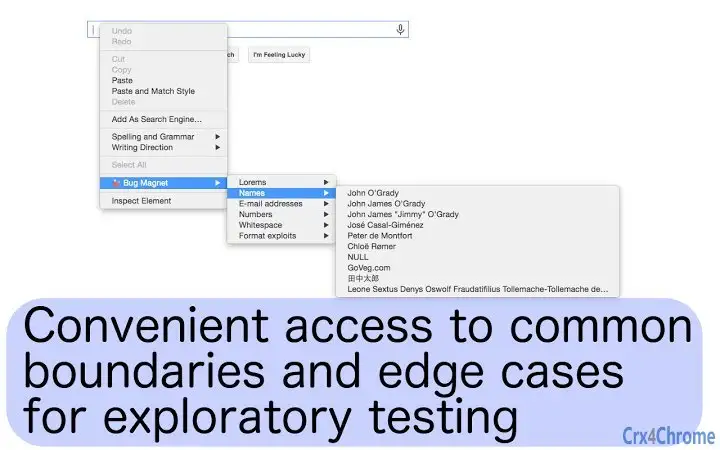
BugMagnet is a specialized browser extension designed to streamline exploratory testing for web applications directly within the Chrome browser. Its primary function is to enhance the testing workflow by providing instant access to commonly encountered edge cases and problematic values through the right-click context menu. This tool is particularly useful for QA engineers, developers, and testers who rely on manual testing to uncover hidden bugs and usability issues.
By integrating directly into the browser, BugMagnet enables users to quickly inject test data into editable elements such as input fields, text areas, and content-editable DIVs. The extension supports multi-frame pages, provided they originate from the same domain, ensuring compatibility with complex web applications. It is built with minimal overhead—less than 1KB per page—making it unobtrusive and non-invasive during testing sessions.
Developed by Gojko Adzic, a recognized figure in the software quality domain, BugMagnet reflects a focus on practical, developer-friendly tools. The software is open-source and customizable, allowing teams to extend its functionality through user-defined configuration files. This makes it suitable for both individual testers and collaborative QA environments.
Key Features & Capabilities
- Right-Click Access to Edge Cases – Adds a context menu option for editable elements, allowing immediate insertion of common test values like empty strings, special characters, and boundary values.
- Customizable Test Data – Users can extend the default set of test values with their own configuration files, enabling tailored testing for specific applications or domains.
- Multi-Frame Support – Functions across multiple frames within a single domain, useful for testing complex web applications with embedded components.
- Minimal Performance Impact – Operates with less than 1KB of overhead per page, ensuring no interference with the web application’s execution.
- Passive Operation – Does not load third-party libraries or execute active scripts, maintaining a secure and stable testing environment.
- Open-Source & Transparent – Available on GitHub, allowing full inspection, modification, and contribution from the community.
For example, during a session testing a form field, a tester can right-click on an input and instantly insert values like “







